Best Claude Code Mods and Where to Find Them
The best Claude Code mods by job: usage-meter for plan limits, context-bar for context, whats-agent-doing for live activity, and how to vet the rest.
The short answer. Five mods cover most needs: usage-meter for plan limits and session cost, context-bar for what fills the context window, whats-agent-doing for what Claude is doing right now, ci-watch for the CI run after a push, and transcript-redactor to keep API keys out of the transcript. The first three only watch and draw. For more, browse claude-mods.com and check any pick against the awesome-claude-code-mods catalogue, which scans every mod for what its code can reach. Run claude plugin validate on a mod before you install it.
Anthropic launched Claude Code mods on 1 October 2026 and described them as “small TypeScript functions that change how Claude Code works.” Mods ran in early access through September, so by launch day there were already more than 70 on GitHub. Eleven days later the awesome-claude-code-mods scanner counted 3,561 mods in 1,825 repositories. Most are experiments, duplicates or one-person tools. This page is the short list: 46 mods that each do one job, are maintained and licensed, and say what they touch.
The best Claude Code mods at a glance
Every mod here is free with its source on GitHub, and most install the same way: add its marketplace with /plugin marketplace add <owner>/<repo> (the linked repository), then run /plugin install <plugin ID>. “See repo” means the mod installs another way, explained in its section below. Reach is the widest thing a mod’s code can touch, from the awesome-claude-code-mods scan: L0 draws and remembers, L1 reads, L2 writes files, runs processes or drives Claude, L3 reaches the network. Stars and last push were read from the GitHub API on 12 October 2026.
| Mod | Job | Reach | Stars | License | Last push | Plugin ID |
|---|---|---|---|---|---|---|
| token-ledger | Cost and plan usage | L0 | 9 | None | 15 Sep | token-ledger@claude-mods |
| usage-meter | Cost and plan usage | L1 | 200 | MIT | 11 Oct | usage-meter@claude-code-mods |
| usage-band | Cost and plan usage | L1 | 13 | MIT | 3 Oct | usage-band@cc-usage-band |
| token-weather-usage | Cost and plan usage | L1 | 12 | Apache-2.0 | 11 Oct | token-weather-usage@augiefra-mods |
| cache-tax | Cost and plan usage | L2 | 152 | MIT | 4 Oct | See repo |
| budget-guard | Cost and plan usage | L2 | 9 | None | 15 Sep | budget-guard@claude-mods |
| cctop | Cost and plan usage | L2 | 9 | MIT | 1 Oct | cctop |
| cache-keepalive | Cost and plan usage | Not scanned | 0 | MIT | 1 Oct | cache-keepalive@richardjsun-mods |
| context-bar | Context window | L1 | 200 | MIT | 11 Oct | context-bar@claude-code-mods |
| context-report | Context window | L1 | 47 | MIT | 9 Oct | See repo |
| context-xray | Context window | L1 | 6 | MIT | 9 Oct | context-xray@claude-pro-kit |
| session-meter | Context window | L2 | 6 | MIT | 10 Oct | session-meter@claude-code-mods |
| token-weather | Context window | Not scanned | 212 | Apache-2.0 | 8 Oct | See repo |
| agent-flow | What Claude is doing | L0 | 17 | Apache-2.0 | 9 Oct | agent-flow@claude-agent-flow |
| flightdeck | What Claude is doing | L1 | 72 | MIT | 12 Oct | flightdeck@claude-flightdeck |
| subagent-ledger | What Claude is doing | L1 | 8 | MIT | 4 Oct | subagent-ledger@kilimcininkoroglu-mods |
| whats-agent-doing | What Claude is doing | L1 | 7 | MIT | 4 Oct | whats-agent-doing@tzafrir |
| activity | What Claude is doing | L1 | 6 | MIT | 6 Oct | activity@claude-mods |
| where-am-i | What Claude is doing | L2 | 200 | MIT | 11 Oct | where-am-i@claude-code-mods |
| plan-progress | What Claude is doing | L2 | 46 | MIT | 8 Oct | plan-progress@zycck-mods |
| downrange | What Claude is doing | L2 | 0 | MIT | 12 Oct | downrange@downrange |
| review-watch | Repo, PR and CI | L2 | 200 | MIT | 11 Oct | review-watch@claude-code-mods |
| worktree-map | Repo, PR and CI | L2 | 50 | MIT | 3 Oct | worktree-map@awesome-claude-code-mods |
| ci-watch | Repo, PR and CI | L2 | 6 | MIT | 10 Oct | ci-watch@claude-code-mods |
| cc-pr-tracker | Repo, PR and CI | L2 | 5 | MIT | 10 Oct | cc-pr-tracker@cc-pr-tracker |
| pr-watch | Repo, PR and CI | Not scanned | 3 | MIT | 12 Oct | pr-watch@claude-code-pr-watch |
| gh-status | Repo, PR and CI | Not scanned | 2 | MIT | 12 Oct | gh-status@oborchers |
| orphan-server | Your machine | L2 | 8 | MIT | 4 Oct | orphan-server@kilimcininkoroglu-mods |
| collision-guard | Safety and secrets | L2 | 20 | MIT | 2 Oct | collision-guard@nateherk-mods |
| git-gates | Safety and secrets | L2 | 0 | MIT | 7 Oct | See repo |
| honmoon-redact | Safety and secrets | L3 | 6 | Apache-2.0 | 28 Sep | See repo |
| transcript-redactor | Safety and secrets | Not scanned | 6 | MIT | 12 Oct | transcript-redactor@claude-code-mods |
| secret-box | Safety and secrets | Not scanned | 6 | MIT | 12 Oct | secret-box@claude-code-mods |
| blast-radius | Safety and secrets | Not scanned | 212 | Apache-2.0 | 8 Oct | See repo |
| image-view | Reviewing and viewing | L2 | 214 | MIT | 12 Oct | image-view@claude-image-view |
| filetree | Reviewing and viewing | L2 | 150 | MIT | 12 Oct | filetree@claude-code-filetree |
| prompt-rail | Reviewing and viewing | L2 | 28 | MIT | 3 Oct | prompt-rail@oikon48 |
| pinboard | Reviewing and viewing | L2 | 10 | MIT | 7 Oct | pinboard@pinboard |
| replay-theater | Reviewing and viewing | Not scanned | 212 | Apache-2.0 | 8 Oct | See repo |
| terminal-browser | Reviewing and viewing | L3 | 3,822 | MIT | 7 Oct | See repo |
| cc-changelog | Reviewing and viewing | Not scanned | 0 | Not detected | 9 Oct | cc-changelog@cc-changelog |
| storybloq | Memory and long sessions | L1 | 771 | Custom | 5 Oct | See repo |
| ctx-handoff | Memory and long sessions | L2 | 76 | MIT | 9 Oct | ctx-handoff@ctx-handoff-mod |
| lcm | Memory and long sessions | L3 | 55 | MIT | 3 Oct | lcm@lossless-claude |
| Mindful-Claude | While you wait | L0 | 100 | MIT | 14 Sep | mindful-claude@mindful-claude |
| cc-arcade | While you wait | L0 | 44 | MIT | 15 Sep | cc-arcade@cc-arcade |
Four authors on this list named their marketplace claude-code-mods and two named theirs claude-mods, so the part after the @ does not identify the author on its own. Check which repository you added before you install.
What are Claude Code mods?
A mod is a plugin that changes how Claude Code looks and behaves, written as JavaScript or TypeScript event handlers. Claude Code fires an event each time it does something (calls a tool, takes a prompt, draws the spinner), and the mod’s handler can watch it, rewrite it, or answer it so the normal behavior never runs.
That last part is the new thing. In practice it means a mod can:
- draw a pane beside the transcript or a band above the prompt, with buttons and text fields
- redraw parts of Claude Code itself, such as a tool row or the spinner
- hold a tool call, rewrite it, or refuse it
- add a
/commandthat runs your code instantly, with no Claude turn and no tokens
Mods need Claude Code v2.1.287 or later and are on by default, per Anthropic’s mods documentation. Hooks run everywhere Claude Code runs, including the VS Code extension, claude -p and cloud sessions, but only the terminal and the Desktop app’s Code tab draw what a mod draws.
Some of Claude Code’s own features are now mods. /diff is one; so is AGENTS.md support. The source of four built-ins (diff, agents-md, sec-default, telemetry) is public in the mods folder of the Claude Code repository, and it is the best reference code there is if you plan to write your own.
Claude Code mods vs hooks: what changed?
Claude Code already had hooks: shell commands, HTTP requests or prompts you set in a settings file, run at fixed lifecycle points. Mods don’t replace them. The difference is where the code lives.
| Mod | Settings hook | |
|---|---|---|
| Runs as | Functions inside the Claude Code process | A separate shell command, HTTP request or prompt |
| Keeps state between events | Yes, in the module’s variables | No, one process per call |
| Can draw in the interface | Yes | No |
| Can change | Tool calls, prompts, commands, turns, the UI | Whether a call goes ahead, its arguments and result, added context |
| Written in | JavaScript or TypeScript | Any script plus a settings.json entry |
Order matters when both exist. A PreToolUse hook in managed settings runs first and its block is final; then mods run; then the PreToolUse hooks from other settings files and plugins, according to the admin documentation. So a mod that answers a tool call itself can stop your own project-level hooks from ever seeing it. If you rely on a hook as a guard, keep that in mind. (The Claude Code harness guide covers where settings hooks sit among skills, subagents and MCP.)
Where to find Claude Code mods
There is no official mods-only gallery yet. Anthropic points to the Claude directory and /plugin, where mods appear as plugins alongside everything else, and to its own official plugins repository, which does not separate mods out. Discovery has moved to community sites. These are the ones that existed on 2 October 2026, checked that day; the counts for the first two were read again on 12 October 2026.
| Directory | Mods listed | How entries get in | Safety information | Best for |
|---|---|---|---|---|
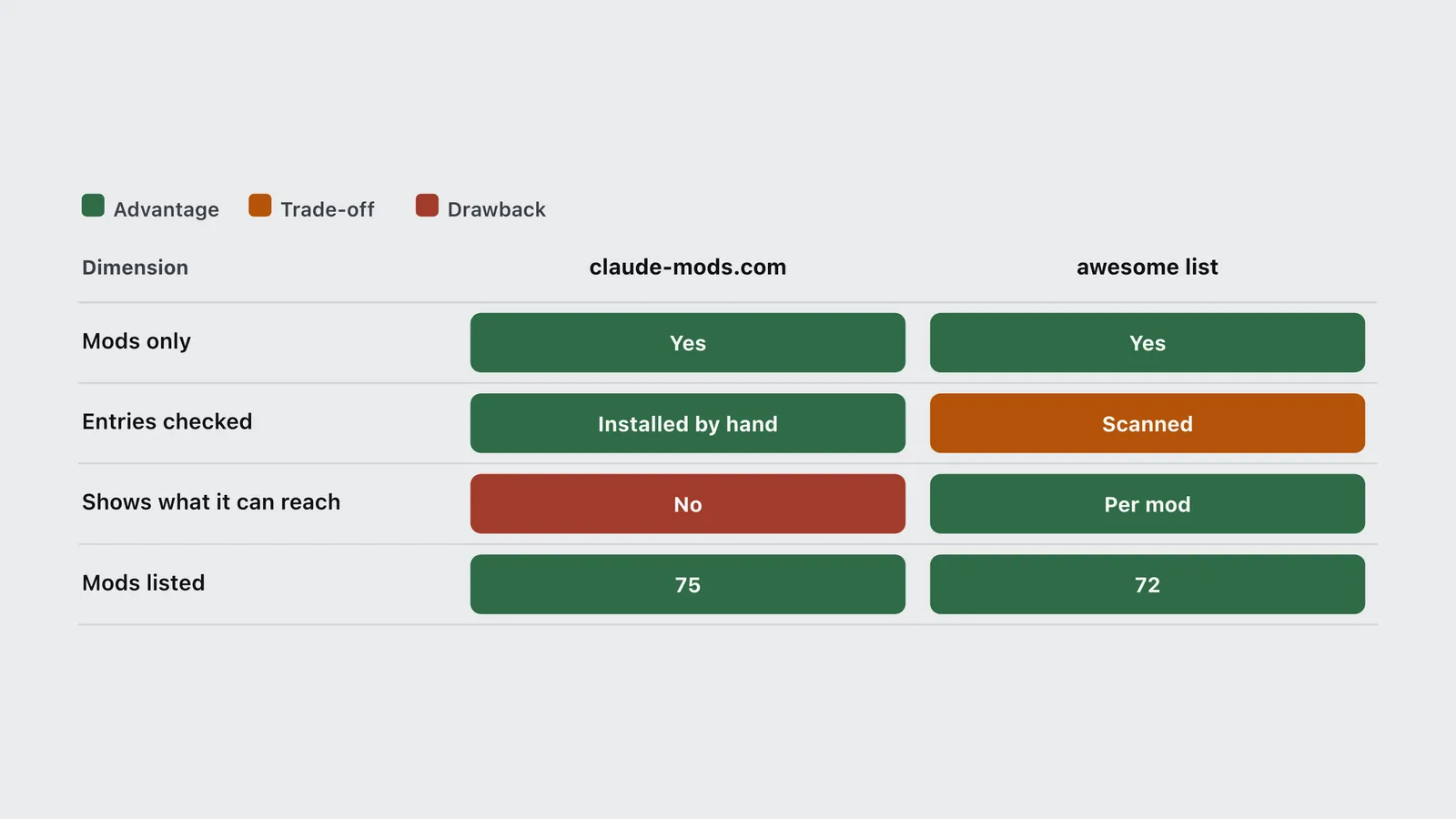
| claude-mods.com | 188 (75 on 2 October) | Daily GitHub scan, then each mod installed and checked by hand against its README; needs a license or a clear author | Category only | Browsing what exists |
| awesome-claude-code-mods | 3,561 in 1,825 repos (72 on 2 October) | Nightly scan of every repo with a hooks module, plus a short hand-picked Featured list | Footprint per mod: events hooked, API calls, reach level | Vetting a mod before install |
| claudemods.ai | 45 in 9 categories | Submissions, plus a daily vote for “mod of the day” | None | Light browsing |
| claude-code-mods (claudecodemods.com) | Mixed with plugins, skills, agents and MCP | Pull request; CI checks the source URL responds | None, by its own statement | Wider extension catalogue |
| claudemod.com | 155 entries, mostly skills and MCP servers | Community listings | None | Not mods specifically |
| Claude directory | Not separated | Anthropic’s plugin submission flow | Plugin-level | Official installs |
| Dimension | claude-mods.com | awesome list | claudemods.ai | claudecodemods | claudemod.com |
|---|---|---|---|---|---|
| Mods only | Yes | Yes | Yes | Mixed | Mostly not |
| Entries checked | Installed by hand | Scanned | No | URL only | No |
| Shows what it can reach | No | Per mod | No | No | No |
| Mods listed | 188 | 3,561 | 45 | Mixed | 155 mixed |
One trap: the GitHub repo that ranked first in search for “best Claude Code mods” on 2 October, 0xDarkMatter/claude-mods, is not about mods in this sense. It was created in November 2025 and bundles skills, agents, commands and settings hooks; the name collision is an accident of timing. It is a fine project. It is just not what you are looking for.
The best Claude Code mods, by job
Seeing what a session costs and how much plan is left
This is where mods earn their keep first, because Claude Code’s own /cost command only answers when you ask.
- token-ledger pins a status line with the session cost, the last turn’s tokens and the cache hit ratio, and adds
/ledgerfor the full table. It is one of the few L0 mods on this list: it only draws and remembers. The repository has no license file, so read it before you depend on it. - usage-meter shows your 5-hour and 7-day plan usage, the countdown to each reset and the session’s cost. It comes from a 200-star collection of small mods whose README shows each one in a screenshot. If you are on a Pro or Max plan, this is the first mod to install.
- usage-band fits the same job into one line: both plan windows with their resets, context tokens and the last turn’s cache hit. Its README says it reads no files, runs no processes and makes no network requests, and the scan agrees it stays at L1.
- token-weather-usage packs the most into one band: context, both plan windows against the clock, how long the prompt cache stays warm and what letting it lapse would cost, and what the session and last prompt cost.
- cache-tax warns before a send that would rewrite a cold cache, with the estimated cost, and
/keepwarm 90mkeeps the cache warm while you step away. The pings cost tokens, which the README says plainly. It installs from the author’s wider marketplace:/plugin marketplace add karanb192/claude-code-mods, then/plugin install cache-tax@claude-code-mods. - budget-guard, from the token-ledger author, watches session dollars and both plan windows. At 80% of a limit it warns once; past the limit, by default, it refuses tool calls and asks before the next prompt. That is a hard stop a settings hook can’t draw or explain.
- cctop opens a btop-style pane with context fill, tokens, cost, cache hit ratio, rate limits, per-tool latency and subagents. More data, more reach: it watches every tool call and compaction.
- cache-keepalive pings the cache with a one-line fork every 50 minutes while a background task outlives it, and stops once the pings have cost what one rewrite would. The savings logic is the author’s own, so treat it as a claim.
None of these change the bill by themselves. They change when you notice it, which is the variable that matters (an earlier replay of 500 sessions found that token-saving tools cut a bill by far less than claimed).
Seeing what fills the context window
- context-bar draws the context window as one stacked bar, a color per category, with token counts and the point where it compacts.
/context-baropens it. Same collection as usage-meter. - context-report prints which instruction files Claude Code loaded (tier, path,
@imports and size) once per context load, and warns when a projectCLAUDE.mdkeeps itsAGENTS.mdfrom being read. That answers “is my memory file actually loading?” It ships inside Darkroom Engineering’s cc-settings bundle, so install it through that repository’s installer. - context-xray opens
/xray, an exact breakdown of what fills your context window: what is sent with every request, what loads on demand, and your memory files and listings. It is one of 23 mods in a kit built to make the Pro plan last longer. - session-meter docks a pane with context by category, where auto-compact kicks in, context growth over turns, the three heaviest items, and both plan windows with whether your pace lasts until the reset. It writes files and can drive Claude, so it sits at L2.
- token-weather is Anthropic’s own one-line context forecast, covered with the other samples below.
Seeing what Claude is doing right now
- agent-flow draws a live tree of subagents and teammates with
/flow. L0: it only draws. - flightdeck is the fullest dashboard here: context and cost, an advisor timeline, every permission check, and subagents as cards or swimlanes. It is in the awesome list’s hand-picked Featured set, and the scan puts it at L1 despite how much it shows.
- subagent-ledger answers the question
/costcan’t: which subagent spent what. One row per agent with its turns, wall-clock time and tokens, costliest first. - whats-agent-doing names the step Claude is on in plain English, and how long it has been on it, in a box above the prompt. Click it to see every step so far. Display only: no network, no files.
- activity shows what Claude is doing this second: the command it is running and for how long, anything waiting for your approval, running subagents, and its todo list with progress. The scan lists a
tool.checkcall, the hook that can approve tool calls, so read that part of the code. - where-am-i keeps the session’s goal, the current step, what waits on you and the next step above the prompt, with
/where. The scan shows it drives Claude to write that summary, so it can spend a little usage. - plan-progress turns Claude’s plan into live progress bars. It is one of the editor’s daily picks, covered in detail below.
- downrange shows progress and an ETA for background shells and Monitor watches, read from their real output or past runs, with no model request. New, with no stars yet, but its README is unusually complete.
Watching the repo, pull requests and CI
- review-watch shows one live line per running code review, whether from Codex or a review subagent, with the model, target, elapsed time and latest output. A toast lists the findings when it ends.
- worktree-map lists every git worktree with its branch. An editor’s pick, covered below.
- ci-watch takes over after Claude pushes a branch, opens a pull request or pushes a tag. A band shows each GitHub Actions run with a progress bar timed against that workflow’s last successful run, then the result in green or red, also as a toast.
- cc-pr-tracker shows watched pull requests above the prompt, with merge state, review and required checks.
- pr-watch keeps a pane of the pull requests the session touched: CI, review, conflicts and merge. You see the moment the pull request Claude opened goes green, gets a review or hits a conflict.
- gh-status puts the current branch’s pull request in one line (state, verdict, pipeline, reviews, unresolved threads and the GitHub account in use), and
/propens the detail. New and not yet scanned. It works through yourghlogin (a separate one per repository if you want), so expect network reach.
All of the pull-request mods need GitHub access through gh or the API. That reach fits the job.
Keeping your machine clean
orphan-server fixes a small, maddening problem. Claude starts a dev server in the background, the session ends, and days later you get address already in use. This mod lists servers that a Claude Bash call started in the current repository and left listening on a port, with their age and a stop button for each. It checks with lsof at session start, after each turn and every 60 seconds.
Keeping secrets out of the model and stopping bad commands
- collision-guard asks before Claude edits a file that another open chat changed in the last 30 minutes. If you run several sessions in one project, this is the guard to add first. Its README says the mods in that repository make no network calls of their own.
- git-gates refuses a commit, push or merge unless your latest message said so. It now sits in its author’s MIT-licensed skills repository and installs with that bundle.
- honmoon-redact redacts API keys and sensitive identifiers from Read, Bash and Grep output. It wraps the
honmooncommand-line tool, which you install first. - transcript-redactor swaps every key that reaches the conversation for a stable placeholder, whether you pasted it, a tool printed it, or it sits in
CLAUDE.md. The real value goes back in when a command runs, so commands still work. The vault lives in memory and is never written to disk. It replaces secret-redactor, which an earlier version of this article listed; the author’s repository now carries this mod instead. - secret-box, from the same author, adds a masked input box: when Claude needs a key, you paste it there, the mod writes it to
.env, and Claude only ever sees a placeholder. It refuses to commit.env. It includes transcript-redactor, so run one or the other. - blast-radius holds risky shell commands until you approve them. One of Anthropic’s samples, below.
A redactor is the clearest case for a mod over a hook: it has to read every tool result and every prompt, which is a lot of reach, granted for a narrow job. Read the code.
Reviewing what changed and seeing more in the terminal
- image-view shows thumbnails of the images you paste above the prompt, instead of bare
[Image #1]tags. - filetree draws an IDE-style file tree with Git status per file and highlights the files Claude reads or edits as it works. It is in the awesome list’s hand-picked Featured set.
- prompt-rail keeps a rail of your past prompts: hover to reread one, click to jump back to it.
- pinboard pins open decisions, the task list and links Claude creates in a pane, so they don’t scroll out of view.
- replay-theater steps through the last turn’s file edits one diff at a time. Anthropic’s sample, below.
- terminal-browser and cc-changelog are editor’s picks with full write-ups below.
Keeping memory across long sessions
storybloq (771 stars) keeps tickets, issues, handovers and lessons in a project folder and works across Claude Code and Codex; install it with its own setup command, which adds the mod. ctx-handoff is a long-session toolkit: it keeps sessions going on their own, has Claude remember what you taught it, and catches its usual slips. lcm stores every message and compacts old turns into a tree of summaries, so nothing is lost outright. All three see every tool call, and ctx-handoff and lcm also see the system prompt. These are the heaviest mods on this list, so they come last.
While you wait
cc-arcade runs nine games above the prompt (Snake, Tetris, 2048, Minesweeper and more) and pauses them when Claude finishes. Mindful-Claude draws a guided breathing band while a turn runs, with four timings. Both are L0, harmless in reach terms, and the fastest way to see what a mod can draw.
What are Anthropic’s sample Claude Code mods?
Anthropic publishes three small, complete mods in its claude-code-playground repository, each with a README that explains how it was built. They are the best code to read before you write your own, and two of them are useful as they stand.
- token-weather draws a forecast of your context window in the band above the prompt, such as “Showers, 67% of context”, with a sparkline of recent turns. It reads real figures from the session’s usage, the same numbers as the status line, not an estimate. It is the smallest of the three: one hooks module and one line of UI.
- blast-radius holds a risky shell command (
rm -rf,git reset --hard, a force push, a database migration), works out what it would change, and opens a pane with Proceed and Cancel. If you cancel, Claude sees the refusal and the reason. It runs commands to measure, so it reaches further than the other two. - replay-theater records each file edit Claude makes in a turn and, when the turn ends, lets you step through them one diff at a time. It only watches: it never blocks, changes or delays an edit.
To install one, clone the repository and follow the folder’s README. They load with claude --plugin-dir ./token-weather for a single session, or install from a local marketplace named claude-code-playground-mods.
Which Claude Code mods are worth using every day?
These four are the editor’s own picks for day-to-day development work. The list above orders mods by how little they reach; this one is chosen on usefulness alone, so check each against the safety steps below before you install it. Repository details were first read from the GitHub API on 4 October 2026 and star counts refreshed on 12 October 2026. For mods aimed at watching a session (live activity, context, CI, memory and plan usage), see Claude Code dashboard mods.
plan-progress: see a long task move
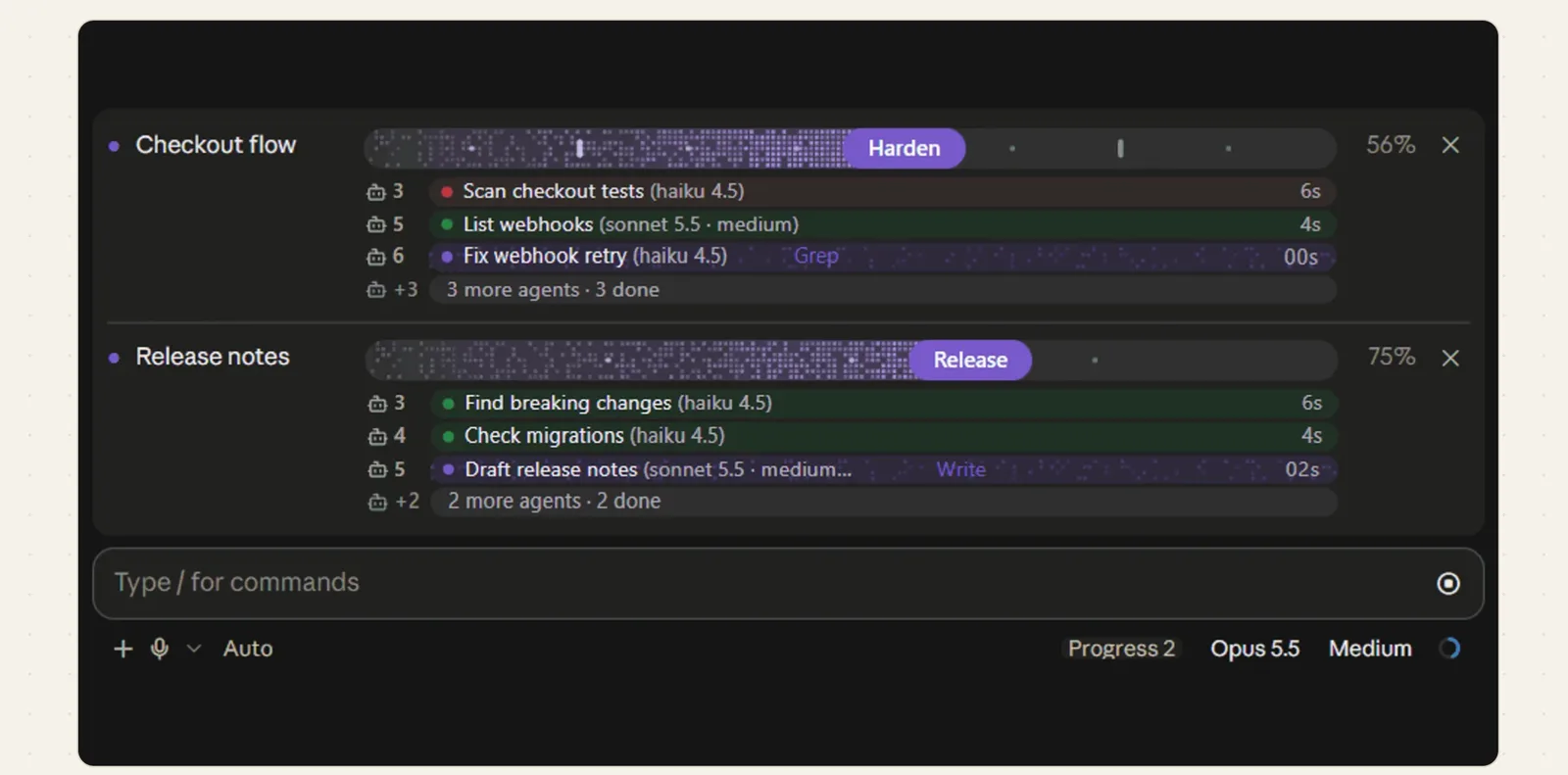
plan-progress turns Claude’s plan into a live progress bar above the prompt: one row per task with its stage, percent and time, and a strip under it for each subagent showing its model, effort and current tool. Approved plans become bars, bars survive a resumed session, and short sounds mark a question, an error and completion. /progress shows or hides it. According to its claude-mods.com listing, it makes no network calls. MIT, 46 stars.
cc-changelog: know what changed in Claude Code
cc-changelog opens the unofficial Claude Code changelog in a pane with /whatsnew: the 25 latest releases, search, and single entries. It also gives the model fifteen tools, so Claude can look up a flag, an environment variable or the mods API itself, and it checks for new releases every 30 minutes with a toast. Its claude-mods.com listing notes the reach: it calls a third-party changelog site (changelogs.core-directive.com) and runs version checks. Listed as MIT, though GitHub does not detect a license file.
terminal-browser: open a page without leaving the session
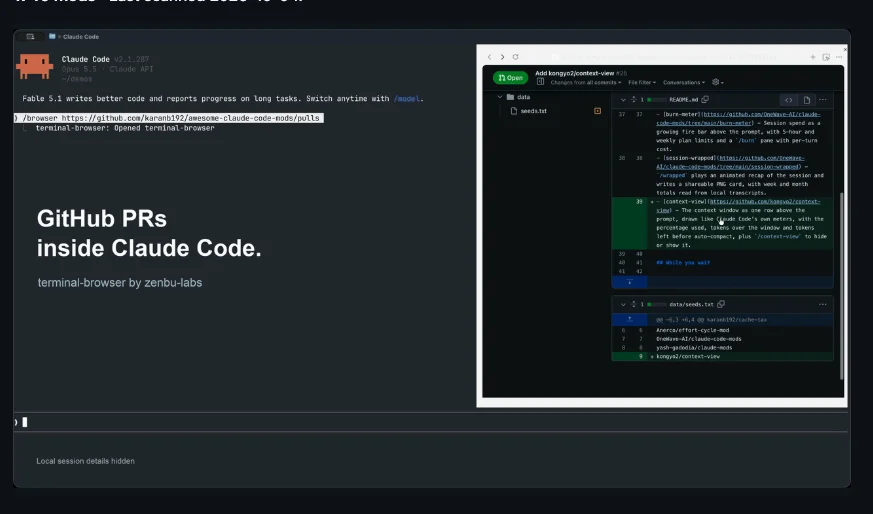
terminal-browser puts a Chromium browser in a pane beside the transcript. Point it at a pull request, a docs page or your local dev server with /browser <url>, and the agent can browse it too. It is the most-starred mod in this article at 3,822 stars. It installs as its own program (brew install terminal-browser, or the script on its README), not through /plugin. MIT. It runs a full browser, so treat it as one of the widest-reaching mods you can install.
worktree-map: see where parallel work lives
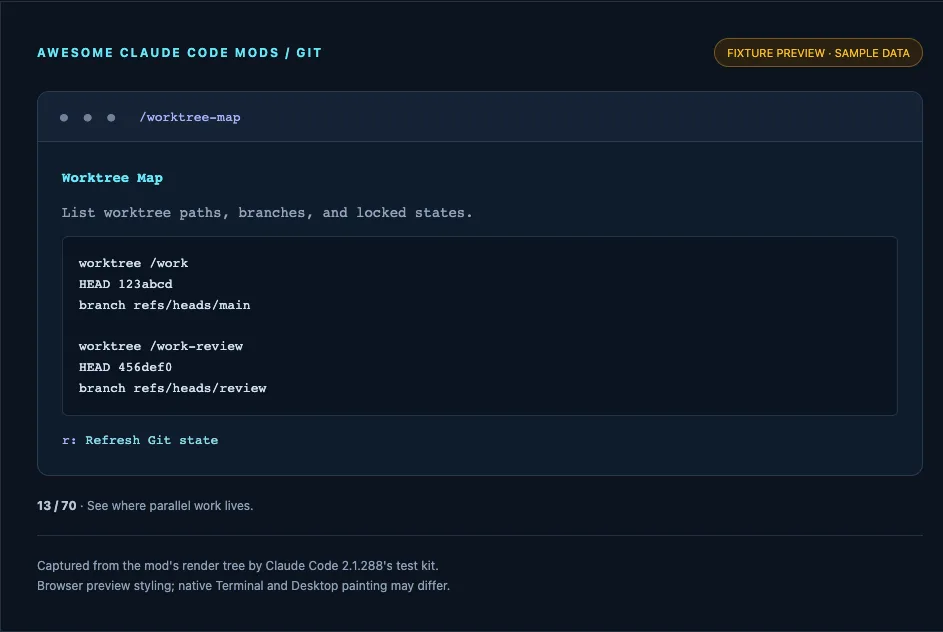
worktree-map lists every git worktree with its path, branch, HEAD and locked state in a pane, via /worktree-map. When several sessions or subagents work in separate worktrees, it answers “which branch is where” without leaving Claude Code. Its README says it runs read-only Git commands only when opened or refreshed, with no network, writes or persistence. MIT.
Are Claude Code mods safe?
Not by default. Anthropic’s own documentation says it plainly: “Mods aren’t sandboxed.” Once loaded, a mod can read and write any file your account can, read environment variables and settings (where API keys live), see every prompt and tool call, approve a tool call before you’re asked, and spend your usage on model calls. Turning on Claude Code’s sandbox doesn’t help: it isolates the Bash commands Claude runs, and a process a mod starts runs outside it.
The catalogue scan shows how much of the ecosystem uses that reach.
| Item | Value |
|---|---|
| L0: draws and remembers | 420 |
| L1: reads | 840 |
| L2: writes, runs or drives Claude | 1,863 |
| L3: reaches the network | 438 |
Reach is a footprint, not a verdict. A pull-request tracker has to call GitHub; a redactor has to read tool output. The question is whether the reach matches the job.
Pluto Security’s analysis, published 22 September 2026 during early access, named four risks: silent access to secrets, no capability disclosure at install time, spoofed prompts drawn inside the terminal, and code fetched after you reviewed it. Some of that has since been narrowed. The documentation now says a mod cannot restyle the permission prompt, though it can still redraw the dialog Claude uses to ask you questions. The fetched-code risk is unchanged.
Four habits cover most of it:
- Run
claude plugin validate ./some-modbefore installing. Itshooks:line lists every event the mod receives and itscalls:line lists what it asks Claude Code to do. Look for$.process.run,$.http.fetch,$.env.getandtool.check(which approves calls). - Prefer mods whose reach matches the job. A status line that also spawns processes deserves a question.
- Pin the version you reviewed. A mod that downloads code at runtime can change after you read it.
- Know the off switches.
claude --safe-moderuns one session without installed mods;"disableAllHooks": trueturns them off everywhere. On a Team or Enterprise plan, a built-in guard calledsec-defaultloads ahead of user mods, keeps your deny rules in force, and lets an admin allow only the organization’s own mods.
How to install your first mod
Mods install like any plugin, from a marketplace (often just a GitHub repo with a marketplace file).
- Check your version with
claude --version; you need 2.1.287 or later. - Add the marketplace:
/plugin marketplace add <owner>/<repo>. - Install the mod:
/plugin install <mod-name>@<marketplace-name>. The table at the top gives the exact ID for each mod. - Run
/reload-plugins. Then run/plugin; a dim line under the tabs names the active mods.
To try a mod without installing it, clone its repository and start one session with claude --plugin-dir ./path/to/mod. Nothing persists after you quit.
How do you build your own Claude Code mod?
A mod is a plugin folder whose hooks/hooks.json points at a JavaScript or TypeScript module. The module exports handlers for events such as tool.call, turn.complete or the prompt, and each handler can watch the event, change it or answer it. Drawing works the same way: a handler returns UI for the band above the prompt or for a pane, and Claude Code redraws it as state changes. Anthropic’s mods documentation lists the events and the $ calls a mod can make.
The fastest route is to ask Claude Code. A built-in skill, plugin-authoring, exists for exactly that, and Addy Osmani’s getting-started walkthrough on the claude.dev blog builds a small mod from scratch. Read Anthropic’s three samples above and the four built-ins in the Claude Code repository before you design anything bigger. Then check your mod with claude plugin validate, which reports the same hooks and calls a reviewer would look for.
For a pack of monitoring mods built and run on a real project, with a code sketch to start from, see Claude Code dashboard mods, part of the site’s own Claude Code harness. If what you want is instructions or tools for Claude rather than code inside Claude Code, a skill or an MCP server is still the lighter choice; the Claude Skills vs agent skills vs MCP breakdown covers those, and the Claude Skills directory lists them.
Frequently asked questions
- What are the best Claude Code mods?
- For most people: usage-meter for plan limits and session cost, context-bar for what fills the context window, whats-agent-doing for what Claude is doing right now, ci-watch for the CI run after a push, and transcript-redactor to keep API keys out of the transcript. The first three only watch and draw, so they are the safest place to start.
- What is the best Claude Code mod to install first?
- A mod that solves a real problem with little reach. usage-meter or token-ledger shows what a session costs and touches almost nothing. transcript-redactor is the pick if API keys or customer data pass through tool output. Check either with claude plugin validate before installing.
- Is there an official Claude Code mods directory?
- Not a mods-only one. Mods install as plugins through /plugin or the Claude directory, where they sit alongside other plugins. The mods-specific directories are community sites: claude-mods.com lists 188 hand-checked mods and the awesome-claude-code-mods catalogue scans 3,561 for what each can reach. Neither is affiliated with Anthropic.
- How many Claude Code mods are there?
- The awesome-claude-code-mods scanner counted 3,561 mods in 1,825 GitHub repositories on 12 October 2026, eleven days after launch. Most are experiments or near-duplicates; claude-mods.com, which checks each one by hand, listed 188 the same day.
- Do Claude Code mods cost tokens?
- A mod runs as code inside Claude Code, so drawing a pane or running a mod command uses no tokens. A mod can still spend your usage if its code calls a model through the mods API, and claude plugin validate lists that call as $.model.complete.
- Do Claude Code mods work in VS Code?
- A mod's hooks run everywhere Claude Code runs, including the VS Code extension, claude -p and cloud sessions. Only the terminal and the Desktop app's Code tab draw what a mod draws, so a status band or pane will not appear in VS Code.
- What is the difference between a Claude Code mod, a skill and an MCP server?
- A skill gives Claude instructions and an MCP server gives Claude tools; both work through the model. A mod is code inside Claude Code itself: it can draw in the interface and change or block tool calls and prompts without a model turn.
- Can I turn Claude Code mods off?
- Yes. Disable one mod from the Installed tab in /plugin, start a single session without installed mods using claude --safe-mode, or set disableAllHooks to true in ~/.claude/settings.json to turn off every installed mod. Built-in mods such as /diff have their own switches.
Sources
- Anthropic (2026). Customize Claude Code with mods in TypeScript. Claude blog. https://claude.com/blog/claude-code-mods
- Anthropic (2026). Mods overview. Claude Code documentation. https://code.claude.com/docs/en/plugins/mods/overview
- Anthropic (2026). Manage mods for your organization. Claude Code documentation. https://code.claude.com/docs/en/plugins/mods/admin
- Anthropic (2026). Claude Code repository, mods folder. GitHub. https://github.com/anthropics/claude-code/tree/main/mods
- Osmani, A. (2026). Getting started with Claude Code mods. claude.dev blog. https://claude.dev/blog/getting-started-with-claude-code-mods/
- Melzer, E. (2026). Claude Code Mods Security: 4 Function Hook Risks. Pluto Security (vendor analysis). https://pluto.security/blog/claude-code-function-hooks-security/
- Anthropic (2026). Claude Code mods examples (token-weather, blast-radius, replay-theater). claude-code-playground, GitHub. https://github.com/anthropics/claude-code-playground/tree/main/claude-code/mods
- Bansal, K. (2026). Awesome Claude Code Mods. GitHub. https://github.com/karanb192/awesome-claude-code-mods
- Bansal, K. (2026). Mod catalogue (scan of 12 October 2026). https://mods.aidojo.si/
- Claude Mods (2026). A directory of mods for Claude Code. https://claude-mods.com/