Claude Skills vs Agent Skills vs MCP vs Prompts
The four ways to extend an AI coding agent: what a Claude Skill, an agent skill, an MCP server and a prompt library each change, and when to use which.
The words blur together, but Claude Skills, agent skills, MCP servers and prompt libraries are four different things, and confusing them leads to a bloated, slower agent. The short version: a Skill and a prompt change how the agent behaves, an MCP server changes what the agent can reach, and an agent skill is just a Skill that is not built by Anthropic. Everything else is detail, and the detail decides how much you should trust each one and how many you can afford to load.
The four ways to extend an agent
Here is the whole taxonomy in one place, because most articles pick one term and ignore the other three.
| Extension | What it is | What it changes | Who ships it |
|---|---|---|---|
| Claude Skill (first-party) | A folder with a SKILL.md of instructions, loaded on demand |
How the agent behaves | Anthropic |
| Agent skill (community) | The same SKILL.md format, published by anyone |
How the agent behaves | The community |
| MCP server | A connector exposing tools and data over a protocol | What the agent can reach | Vendors and community |
| Prompt or command library | Reusable text you paste or copy in | How the agent behaves, per task | The community |
An Agent Skill is a folder of instructions, scripts and resources that the model loads automatically when a task matches it, per Anthropic’s platform documentation (2026). “Claude Skill” and “agent skill” name the same primitive; the only real difference is provenance. Anthropic’s own skills carry no third-party code and load across Claude.ai, Claude Code and the API. A community agent skill uses the identical format but is written by a stranger, which changes the trust question entirely.
An MCP (Model Context Protocol) server is an open-standard connector that gives the agent tools and live data, per the Model Context Protocol documentation (2026). It is not instructions. It is a running process the agent can call to read a repo, query a database or drive a browser. Skills tell the agent how to act; MCP servers extend what it can act on.
A prompt or slash-command library is the lightest layer: reusable text, copied into your project or pasted into a chat. It changes behavior like a skill does, but per task and with nothing to install and nothing to run.
Behavior versus reach: the distinction that matters
The single most useful cut is this. Skills and prompts are instructions: text the model reads before it acts. MCP servers are capabilities: tools the model invokes while it acts.
You often want both at once. Wire up a database MCP server so the agent can run queries, then add a Skill that tells it how you want queries written (read-only by default, no SELECT *, always explain the plan). The server grants the reach; the skill supplies the judgement. Neither replaces the other.
This also explains the risk gradient. A prompt library is just text you can read in full before using it. A community agent skill is instructions the model will follow, so a malicious one is a prompt-injection vector. An MCP server is code that runs with access to your tools and credentials, which is the highest-trust category of the four. Anthropic’s guidance and every serious practitioner say the same thing: treat community skills and servers like any third-party dependency, and read the source first. Skills that rewrite text deserve the same caution for a different reason: run a rewriter such as the Humanizer skill on a copy and read the diff before accepting it.
The context tax nobody prices in
Every extension you load is not free. It spends the scarcest resource an agent has: context. A skill’s instructions, a server’s tool definitions, a command’s text all enter the model’s window and get read on every request, whether or not they are used. Past a point, adding more makes the agent worse at choosing, not better.
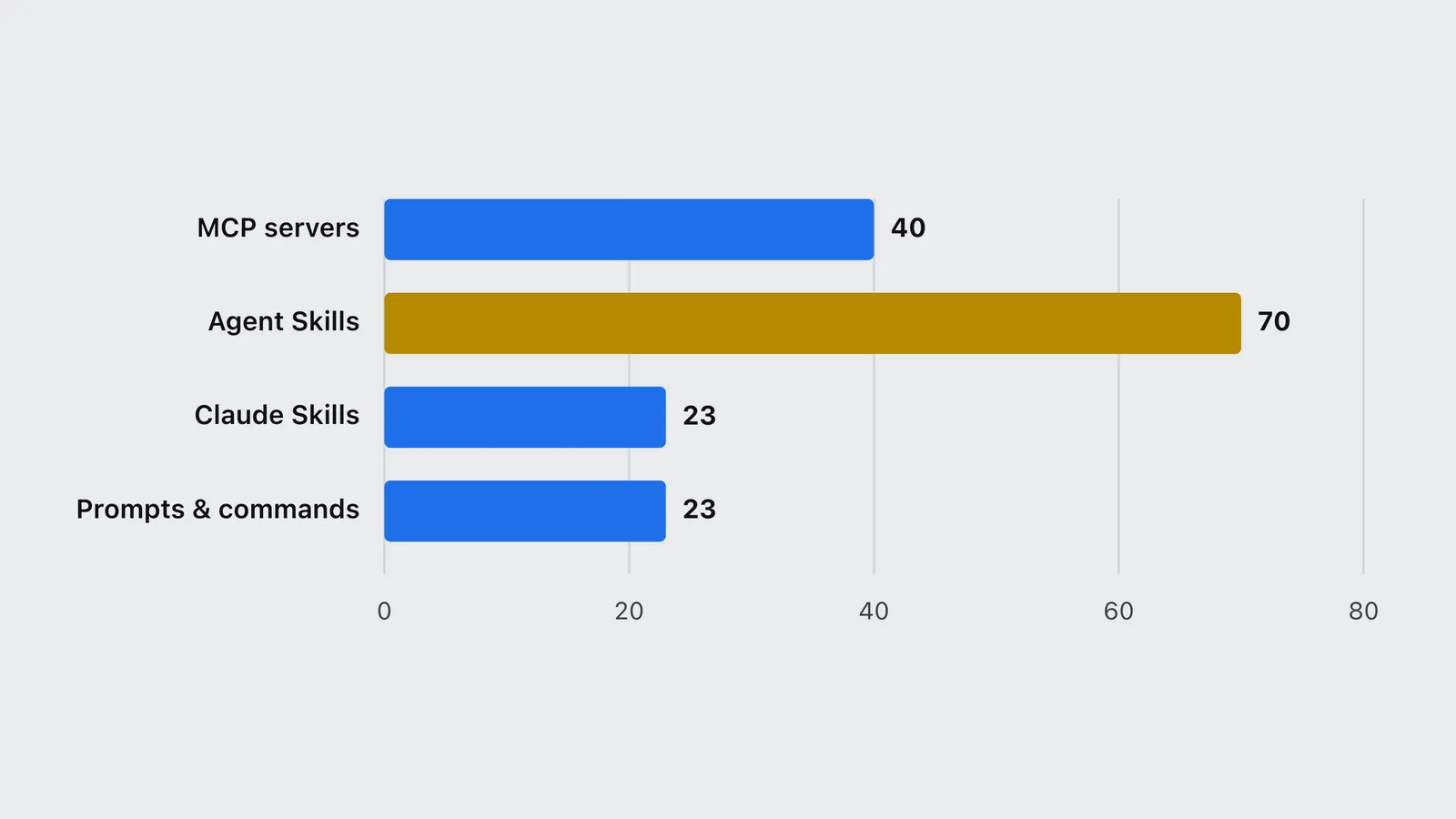
This has hard numbers behind it. Cursor documents a ceiling of about 40 active tools across all connected MCP servers, and the consensus trio of popular servers already loads 67 tool definitions at default settings. The mechanism, and why loading fewer servers can make an agent measurably sharper, is covered in depth in the Claude Code harness guide and the MCP servers worth installing on this site. The ecosystem’s own rule of thumb is that eight to twelve well-chosen skills cover most of a senior developer’s day; past that, quality tends to fall.
| Item | Value |
|---|---|
| MCP servers | 40 |
| Agent Skills | 70 |
| Claude Skills | 23 |
| Prompts & commands | 23 |
Which one to reach for
Map the need to the layer:
- You want the agent to follow a standard or a workflow (your review checklist, a TDD loop, a house style): a Skill or a prompt library. Start with Anthropic’s first-party skills, then add a vetted community agent skill.
- You want the agent to touch a system (a repo, a database, a browser, an issue tracker): an MCP server. Four or five connectors cover most real work.
- You want a one-off, readable behavior tweak: a prompt or slash command copied into your project, so you own every line.
- You want document, design or artifact output (Word, Excel, PowerPoint, PDF, a polished UI): a first-party Claude Skill, which ships these with no install risk.
How to choose without bloating your agent
The goal is the smallest set that covers your work, not the longest. Start first-party, because Anthropic’s skills add capability with no third-party code. Add MCP only for reach, and keep the connector count low enough to stay under the tool ceiling. Add community skills for discipline, but vet each repo, because a skill is instructions your model will obey. Keep prompts as text you own and can edit.
The cost of all this is not the skill; it is the agent’s tokens. To turn any of it into a budget, see what a real task actually costs on the cost-per-task calculator, and browse the full, source-linked catalog of skills, servers and prompt libraries in the Claude Skills and agent directory, which tracks 156 entries across all four legs with a tier on each.
Bottom line
Skills and prompts change how an agent behaves; MCP servers change what it can reach; agent skills are community skills, held to the same trust bar as any dependency. Pick the layer that matches the need, load the fewest you can, and read the source before you install anything you did not write. The extension layer is powerful precisely because it is cheap to add, which is also exactly why it is easy to overload.
Sources
- Anthropic (2026). Agent Skills overview. Anthropic platform documentation. https://platform.claude.com/docs/en/agents-and-tools/agent-skills/overview
- Model Context Protocol (2026). Introduction. modelcontextprotocol.io documentation. https://modelcontextprotocol.io/introduction
- Capital & Compute (2026). Claude Skills, agent skills and MCP servers directory. https://capitalandcompute.net/claude-skills/
Frequently asked questions
- Is a Claude Skill the same as an agent skill?
- They are the same primitive: a folder with a SKILL.md file of instructions the model loads on demand. In practice, Claude Skill often refers to Anthropic first-party skills, while agent skill refers to the same format published by the community. The format is identical; the difference is who wrote it and therefore how much you should trust it.
- What is the difference between a skill and an MCP server?
- A skill is instructions that change how the agent behaves. An MCP server is a connector that changes what the agent can reach, exposing tools and live data such as a repository, a database or a browser. You often use both together: a server grants access, a skill governs how that access is used.
- Do I need MCP servers if I already use skills?
- Only if the agent needs to touch an external system. Skills and prompts cannot, on their own, read your database or drive a browser. If your work is purely about how the model writes or reasons, skills and prompts are enough. If it needs live data or actions, add the matching MCP server.
- How many skills and servers should I install?
- Fewer than you think. Every skill and server spends context the agent could use on your task, and tools past roughly 40 can silently drop out in some clients. The working consensus is eight to twelve well-chosen skills, plus four or five MCP connectors, covers most real workflows.